Posts

DIY backing cover plate for Eufy doorbell

Image
Make your own backing cover plate for a Eufy doorbell (DIY) I recently upgraded my old LaView doorbell to a Eufy 2K Pro doorbell.  The Eufy is a tad slimmer and exposed some of the roughed up exterior wall.  Not only was it unsightly, but if you looked from the side, you could actually see and potentially pull out the power cables using something like a paper clip.  I looked online for some wall backplates and found some on Amazon with names like Wasserstein or Vomenc.   But most of these were for Ring or Blink doorbells.  I just needed something simple.  At first, I thought to find a piece of generic black plastic, but then found an almost perfect match. View after initial mounting with exposed hole You can just use a simple light switch plate that costs less than $1 at a home improvement store.  The screw holes almost line up perfectly - I ended up screwing one in at a slight angle and it was fine.  Also, I opted to use some stronger screws I h...
ColorTool throwing error "Invalid URI: The hostname could not be parsed." for Microsoft WSL

Image
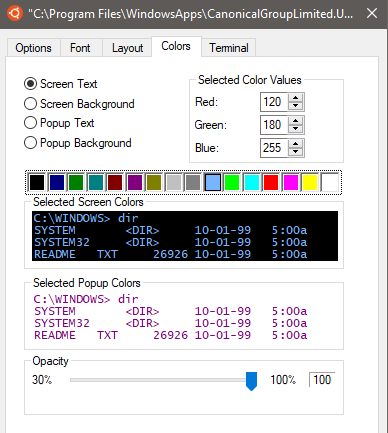
Windows Subsystem for Linux (WSL) is pretty cool. We've had some good alternatives like Cygwin and virtual machines, but having a Microsoft-supported Linux kernel that runs natively in Windows is a whole other story. If I had a time machine and visited my younger self to tell me about the future, I could talk about neat things like almost self-driving cars, reusable rockets, cryptocurrency, or even an online movement to beat hedge funds in the stock market! My younger self could've believed all these things, but not "Microsoft embraces Linux". Younger self would have branded current me as a bold-faced liar, an imposter! I've been pleased with WSL thus far.  But the default bash color scheme is horrendous (this isn't necessarily specific to WSL itself, as other Linux native bash shells have similar issues). What I'm talking about are dark colors on a black background, the worst being dark blue on black, and some colored font on a green background. ...

Kill-a-Watt power consumption comparison for three wi-fi routers: ASUS and Cisco / Linksys

Image
I've used open source router firmwares such as DD-WRT, TomatoUSB, and most recently FreshTomato and Asuswrt-Merlin. I had been using a trusty Cisco/Linksys E2000 on TomatoUSB 1.28 for a number of years, and sometimes marveled at its relatively good range despite having no external antennas. But having read ASUS routers and their stability, along with the Asuswrt-Merlin firmware and its ease of installation, I bought a couple of used ASUS routers. I picked up an RT-AC66U (AC1750) and a T-Mobile co-branded RT-AC68U (AC1900). Installing the latest supported Asuswrt-Merlin was a breeze. Then it was time to measure wattage to see how much power usage increase (all tested with wi-fi only, no customizations, no WAN connection, 1 LAN connection). Cisco/Linksys E2000 running FreshTomato 2020.8, 5W usage: ASUS RT-AC66U on Asuswrt-Merlin 380.70, 9-10 W usage: ASUS RT-AC68U on Asuswrt-Merlin 384.19, 9-10 W usage: I was pleasantly surprised that I'm able to r...

How to download videos in the Hikvision / LaView Playback mode

Image
The Hikvision web browser interface can be clunky and downright frustrating to use. One of the most important functions is simply to be able to download any surveillance video clips for copying or distributing. There are at least two things you must do before you can download videos, and it's not apparent or documented (at least that I could find). Run the browser as administrator (in Windows, right-click on the browser icon and Run as Administrator). If you were reviewing a video in playback mode, as one does 99% of the time before deciding to download, you have to stop the video playback (even if paused) or you'll get an error "Downloading failed." How nice it would have been if they simply added a message "Please stop playback first." Here's a screenshot showing a successful download. Another thing that might be clunky is that choosing a different download directory in Configuration may not work well. I j...

Domain registrar pricing list, updated for 2020

Registering a domain name is like trying to sign-up for and find the real cost of a cell phone plan. I couldn't find a good, unbiased and up-to-date domain price comparison (some try to funnel you to sign up for a particular registrar so they can earn a commission; I have affiliate links, but my chart is sorted by price alone!). This was pretty comprehensive, but out-of-date.   Now, this one is pretty close (Sept. 2012) , but didn't include pricing. So after personally visiting a bunch of registrar sites, I came up with the price list below. For today's post, I'm reserving comment about the quality or morality of most of these registrars, but I highly recommend doing an online search or checking a site like Better Business Bureau to make sure you're not going with a bait-and-switch type of company. These are all for a .com name, 1-year registration ignoring the introductory pricing (in other words, these are the year 2 and onward prices). These were ch...

Laview PDB1520F1 doorbell cam ONVIF RTSP URL

Image
I recently set up Shinobi  to replace an old NVR system, to support newer assorted cameras consisting of LaView, Amcrest, and Reolink brand cameras. While most of these are likely some re-brand of Dahua or Hikvision, it was still hard to find all the necessary information.  The manuals are definitely lacking, even if some of them were written in plain English. The LaView PDB1520F1 was the hardest.  It appears to be a re-brand of the Hikvision DS-KB6003-WIP.  There are several other brands that appear to be the same, such as the RCA HSDB1. When I tried to add the LaView doorbell to my Shinobi monitors list, it kept failing the probes no matter what I tried.  I searched endlessly, but was using the wrong keywords.  I kept seeing posts where people said to flash the LaView firmware ONTO the Hikvision or other re-branded cams in order to get the ONVIF stream. But I couldn't find the ONVIF details in those posts. First, I installed the ONVIF Device Man...